

Picture this: You spend hours writing a fantastic blog post. The words flow, the ideas feel fresh, and you hit “publish” with excitement. Then… crickets. No traffic from Google. No shares. No comments from readers across the United States.
The problem? Most new bloggers focus only on what they say, not how they organize it. In 2026, Google loves clear, scan able, user-friendly structure. A smart SEO blog structure for beginners turns good posts into ones that rank on page one, keep readers hooked, and drive real traffic from New York to California.
This guide explains everything in simple English. You’ll learn how to structure a blog post for SEO, the exact SEO blog post format step by step, and a ready-to-use SEO-friendly blog structure checklist. Whether you blog about local food in Texas, tech gadgets in Silicon Valley, or small-business tips in Florida, these tips will help your content stand out.
What Is SEO Blog Structure and Why U.S. Bloggers Need It
SEO blog structure means organizing your post so both readers and Google understand it easily. Think of it like a well-organized store: customers (readers) find what they need fast, and the manager (Google) knows exactly where everything belongs.
For bloggers in the United States, this matters more than ever. Americans search on mobile while commuting in Chicago or relaxing in Miami. Google’s Helpful Content Update and mobile-first indexing reward posts that feel helpful and easy to read. Poor structure leads to high bounce rates and lost rankings.
Good structure improves:
- Crawl ability (Google understands your content hierarchy)
- Readability (visitors stay longer)
- Featured snippet chances (position zero traffic)
In 2026, clear blog post structure that ranks on Google combines user experience with smart on-page SEO.
SEO Blog Post Format Step by Step
Follow this SEO blog post format step by step every time you write:
- Choose one primary keyword – Place it naturally in the title and first paragraph.
- Write a short, engaging introduction (hook in the first 10 seconds).
- Add a table of contents for posts over 1,000 words.
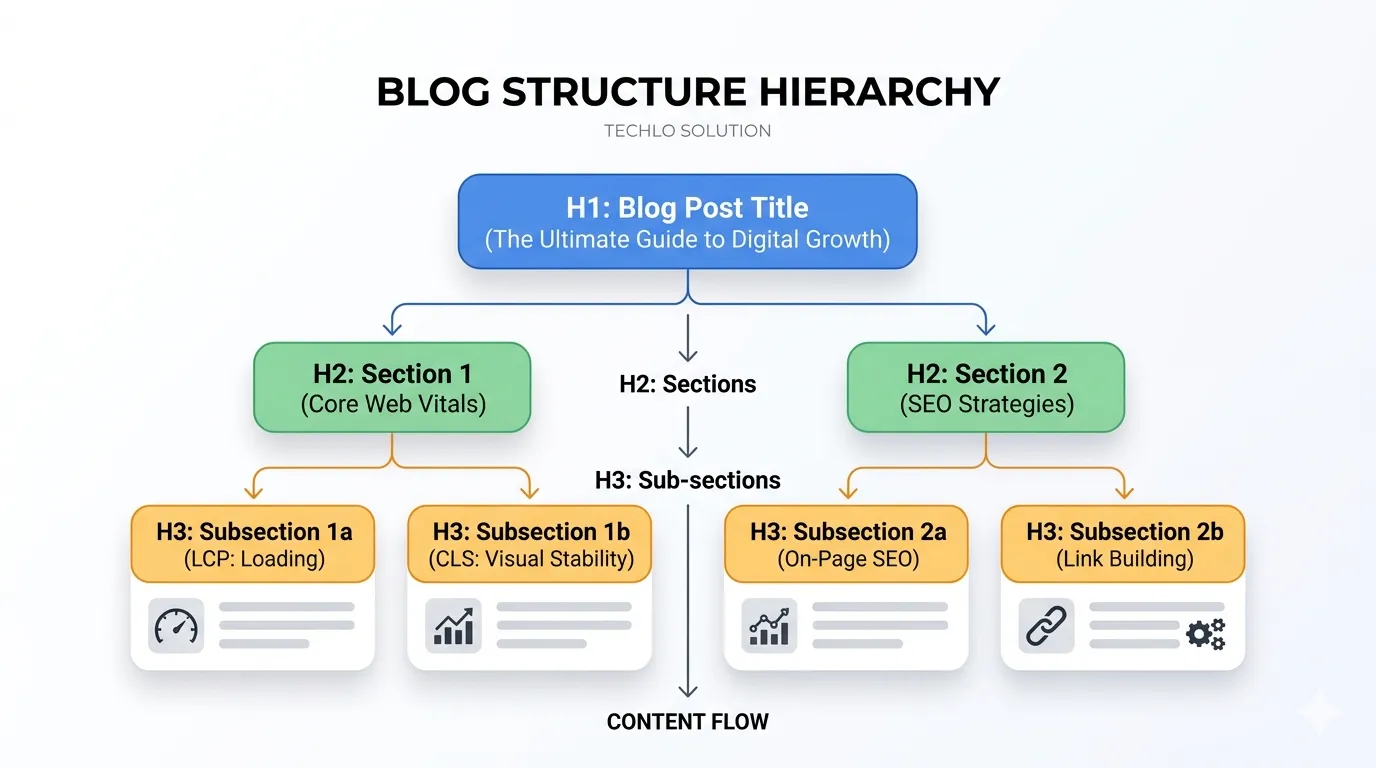
- Use clear headings (H2 for main sections, H3 for sub-points).
- Break text into short paragraphs (2–4 sentences max).
- Add bullet points, numbered lists, and tables.
- Include internal links to related posts on your site.
- End with a strong conclusion and clear CTA.
- Optimize images with descriptive alt text.
- Add an author bio for E-E-A-T signals.
This format works for WordPress bloggers and helps Google see your post as high-quality.
Best Blog Layout for SEO in 2026
The best blog layout for SEO puts user experience first while giving search engines clear signals.
- Mobile-friendly design: Short paragraphs, large fonts (16px+), and thumb-friendly spacing. Over 60% of U.S. searches happen on phones.
- Logical flow: Start broad, then go deep.
- White space: Plenty of breathing room so readers don’t feel overwhelmed.
- Fast loading: Compress images and use lazy loading.
U.S. bloggers who test their layout on real mobile devices see better Core Web Vitals scores and higher rankings.
Your Complete SEO-Friendly Blog Structure Checklist
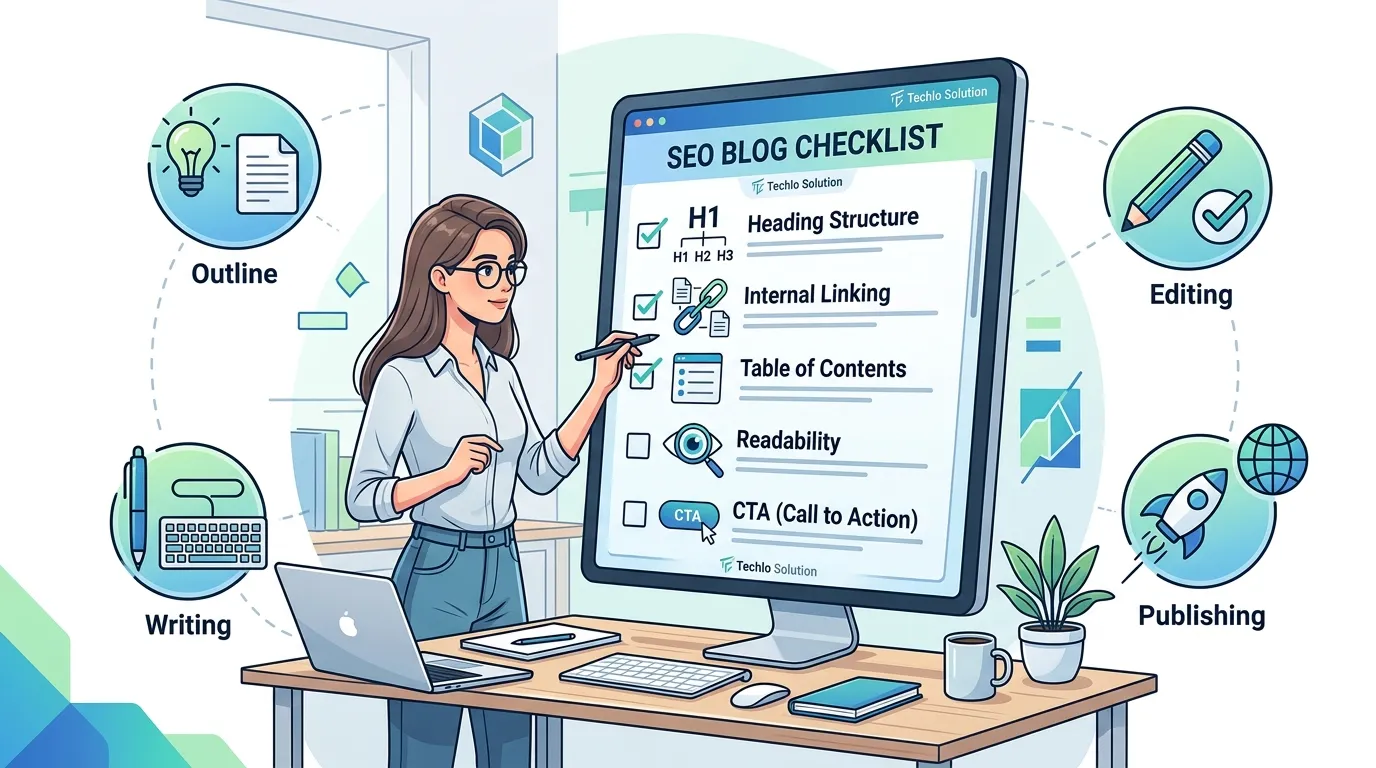
Use this SEO-friendly blog structure checklist before you publish:
- One H1 with primary keyword
- Logical H2 and H3 headings
- Table of contents (for long posts)
- Paragraphs no longer than 4 lines
- At least 3–5 internal links
- Bullet points or numbered lists in every major section
- One or two simple tables for comparisons
- Clear introduction and conclusion
- Mobile preview passed
- Readability score above 60 (use Hemingway App or Yoast)
Check every box and your post is ready to rank.
How to Organize Content for SEO Using Headings
How to use headings in blog posts SEO is one of the easiest wins for beginners.
- H1: Use once – your main title. Include the primary keyword.
- H2: Main sections – answer big questions.
- H3: Break down H2 topics into smaller steps or examples.
Example from a travel blog:
H2: Best Coffee Shops in Seattle
H3: Why Local Cafes Beat Chains
H3: Top 3 Picks for Remote Workers
This heading tags (H1, H2, H3) optimization creates clear content hierarchy in SEO writing and helps Google understand your post.
Ideal Blog Post Length for SEO
Many beginners ask: What is the ideal blog post length for SEO?
Current 2026 data shows top-ranking posts average 1,500–2,500 words. Shorter posts (under 1,000 words) rarely rank for competitive terms. Longer, in-depth guides (2,000+ words) perform best for how to structure a blog post for SEO topics because they cover everything readers need.
Choose length based on intent:
- Quick tips → 1,200–1,500 words
- In-depth guides → 2,000–3,000 words
Focus on depth, not filler. Quality always beats word count.
Blog Introduction and Conclusion SEO Tips
Your blog introduction and conclusion SEO tips can make or break engagement.
Introduction tips:
- Hook with a question or relatable U.S. scenario “Are you sick and weary of creating posts that nobody in Denver or Dallas ever finds?”).
- Include primary keywords early.
- Promise clear value.
Conclusion tips:
- Summarize key takeaways.
- Add a strong CTA (“Try this checklist on your next post and share your results below”).
- Link to related articles.
These bookends improve dwell time and help with featured snippets optimization.
Creating a Winning Blog Post Outline for SEO Success
A solid blog post outline for SEO success saves hours and improves quality.
Steps to build one:
- Research search intent (what exactly are U.S. readers asking?).
- List 5–8 main H2 sections.
- Add 2–3 H3 sub-points under each.
- Note where to place bullets, tables, or images.
- Decide internal link targets.
A good outline turns chaotic writing into a professional SEO blog writing structure.
How to Format Long-Form Blog Content
How to format long-form blog content keeps readers from scrolling away.
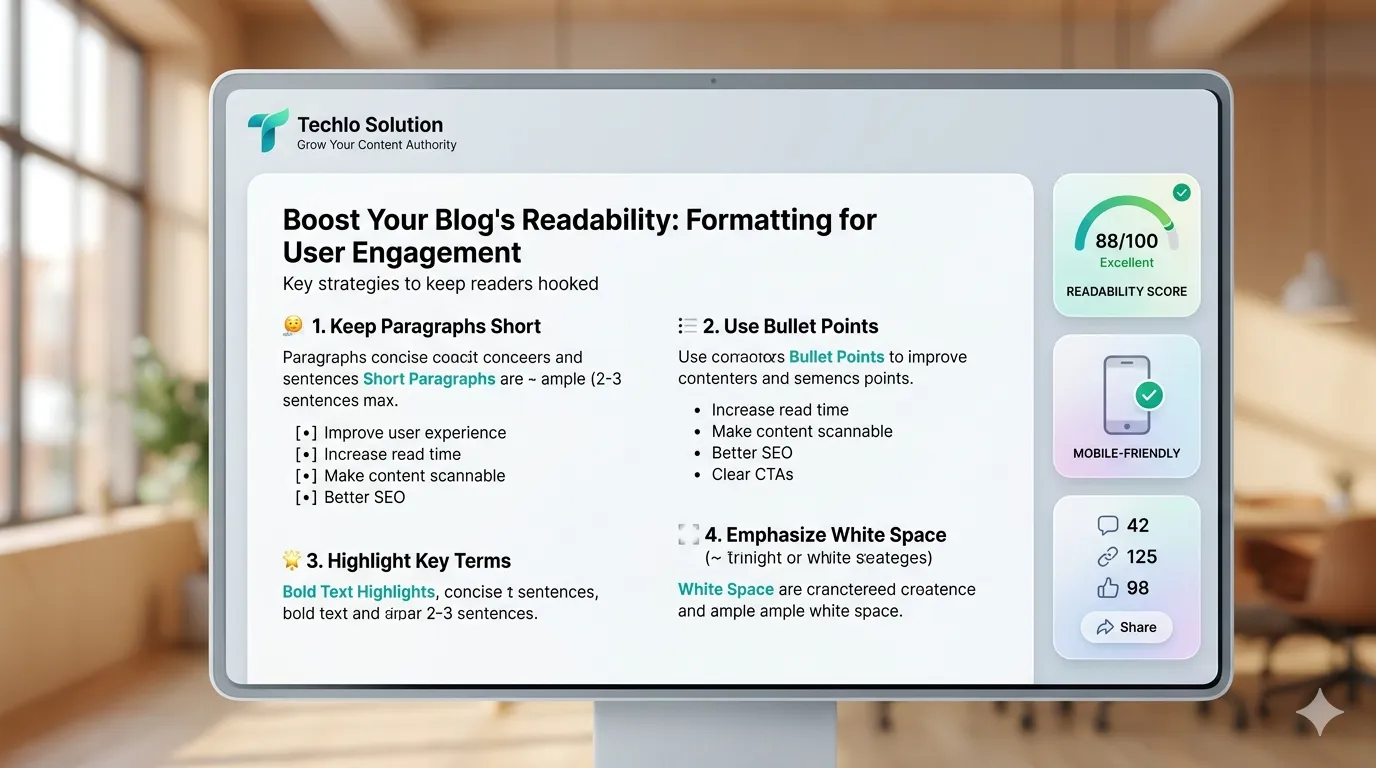
- Add a clickable table of contents right after the intro.
- Use short paragraphs and subheadings every 300 words.
- Insert visuals every 500–700 words.
- Break up text with bold key sentences.
Long-form posts (2,000+ words) rank better when they feel easy to scan.
Optimizing Blog Readability for SEO
Optimizing blog readability for SEO directly affects rankings because Google measures how long people stay.
- Aim for 8th–9th grade reading level.
- Short sentences (15–20 words average).
- Active voice.
- Tools like Yoast SEO or Flesch-Kincaid score help.
Readable content lowers bounce rates and sends positive signals to Google.
Content Scan ability Best Practices
Content scan ability best practices turn walls of text into inviting posts:
- Bullet points for lists
- Numbered steps for tutorials
- Bold important phrases
- Short paragraphs (2–4 sentences)
- Plenty of white space
U.S. readers on phones scan first. Make your post swimmable and they’ll read more.
Internal Linking Structure for Blogs
A smart internal linking structure for blogs spreads authority and helps readers discover more.
- Link to 3–5 related posts naturally.
- Use descriptive anchor text (not “click here”).
- Link from high-traffic pages to newer ones.
This strengthens your entire site and improves blog navigation and UX optimization.
Table of Contents SEO Benefits
A table of contents offers huge SEO benefits for posts longer than 1,000 words:
- Helps readers jump to sections.
- Gives Google clear signals about content organization.
- Increases chances of rich snippets and AI overviews.
In WordPress, plugins like Easy Table of Contents make it automatic.
Mobile-Friendly Blog Layout Tips for U.S. Readers
Mobile-friendly blog layout is non-negotiable in 2026.
- Font size at least 16px.
- Line height 1.5–1.7.
- One-column layout on phones.
- Thumb-friendly buttons and links.
Test every post on real mobile devices. U.S. search traffic is mostly mobile—give readers the experience they expect.
SEO Blog Writing Structure Examples
Here’s a quick SEO blog writing structure example for a post about “SEO for small businesses”:
- H1: SEO for Small Businesses in 2026: Simple Steps That Work
- Intro + primary keyword
- H2: Why Local SEO Matters for U.S. Shops
- H3: Google My Business Tips
- Bullet list of action steps
- Table comparing free vs paid tools
- Conclusion with CTA
Copy this pattern and adapt it to your niche.
Blog Formatting Tips for SEO
Quick blog formatting tips for SEO you can use today:
- Compress images under 100 KB.
- Use descriptive file names and alt text.
- Add schema markup for articles (WordPress plugins do this easily).
- Keep URLs short and keyword-rich.
These small details add up to big ranking improvements.
Strong Conclusion: Start Using Proper SEO Blog Structure Today
You now have everything a beginner needs: the SEO blog structure for beginners, a complete checklist, step-by-step format, and 2026 trends that actually work. The secret isn’t fancy tools or long hours—it’s simple, logical organization that puts readers first.
Open your next WordPress draft right now. Use the checklist. Build a clear outline. Watch how much easier it feels to write and how quickly traffic from across the United States starts to grow.
Ready to see results? Drop your biggest blog structure challenge in the comments below. Or pick one old post and restructure it using the tips in this guide. Your future rankings (and happy readers) are waiting.
My Real-World Experience Learning Digital Marketing
When I first started learning digital marketing, terms like SEO, Google Ads, and content marketing felt overwhelming. I honestly thought this field was only for tech experts, but with consistent practice, I realized that beginners can learn digital marketing step by step. I initially created the error of attempting to learn everything at once, which simply led to confusion. Once I focused on one skill at a time, especially SEO basics, my understanding improved significantly. While learning SEO, I discovered that simply adding keywords is not enough. When I started writing content to genuinely help users, I noticed organic traffic from the United States slowly growing. Many students enter digital marketing expecting quick income, but based on my experience, focusing on learning and real practice first always leads to better long-term results. Using tools like Google Search Console helped me understand what people are actually searching for. At first, it felt confusing, but regular use made it easier to analyze real user behavior. I used to write more for search engines than for human readers. Once I shifted my approach to helping people first, my content performance improved. If you have patience and believe in the learning process rather than taking short cuts, digital marketing can be a viable and future-proof career for students or beginners.
That simple shift—from messy drafts to clean, logical structure—made my own posts start ranking. It will work for you too.
FAQs About SEO Blog Structure for Beginners
What is the best way to structure a blog post for SEO in 2026?
Use one H1, clear H2 and H3 headings, short paragraphs, bullet points, and a table of contents for longer posts. Focus on scan ability and user intent.
For SEO purposes, how long should a blog post be?
Aim for 1,500–2,500 words for most topics. Longer, helpful content ranks better when it truly answers reader questions.
Do I need a table of contents in every blog post?
Add one for any post over 1,000 words. It improves navigation, readability, and chances of featured snippets.
How should I use headings in blog posts for SEO?
One H1 with your main keyword. H2s for major sections. H3s for details. Keep the hierarchy logical and natural.
What makes a blog post structure that ranks on Google?
Clear hierarchy, mobile-friendly formatting, internal links, scan able elements, and content that matches search intent perfectly.
How do I improve blog readability for SEO?
Short paragraphs, simple words, bullet points, and plenty of white space. Test with a readability tool before publishing.
Does proper blog structure help with local SEO in the United States?
Yes! Clear structure makes it easier for Google to understand and show your content in local searches like “best SEO tips for bloggers in California.”
readers) are waiting.
✍️ Author Bio (E-E-A-T Fix)
Written by Techlo Solution
Digital Marketing Learner & SEO Practitioner
Helping beginners and students understand online marketing in simple words.